
Download BitTyrant – Fast, Secure Torrent Client for Windows & macOS
Overview & Core Features
BitTyrant is a “selfish” BitTorrent client that re‑thinks the way peers are selected and unchoked during a download. Built on the solid foundation of the popular Azureus (Vuze) client, BitTyrant replaces the default choking algorithm with a bandwidth‑optimised strategy that favours peers offering the best upload rates. In practice this means the client constantly measures how much data each neighbour returns for the amount of data it receives, then reallocates its upload slots to those who give the highest return.
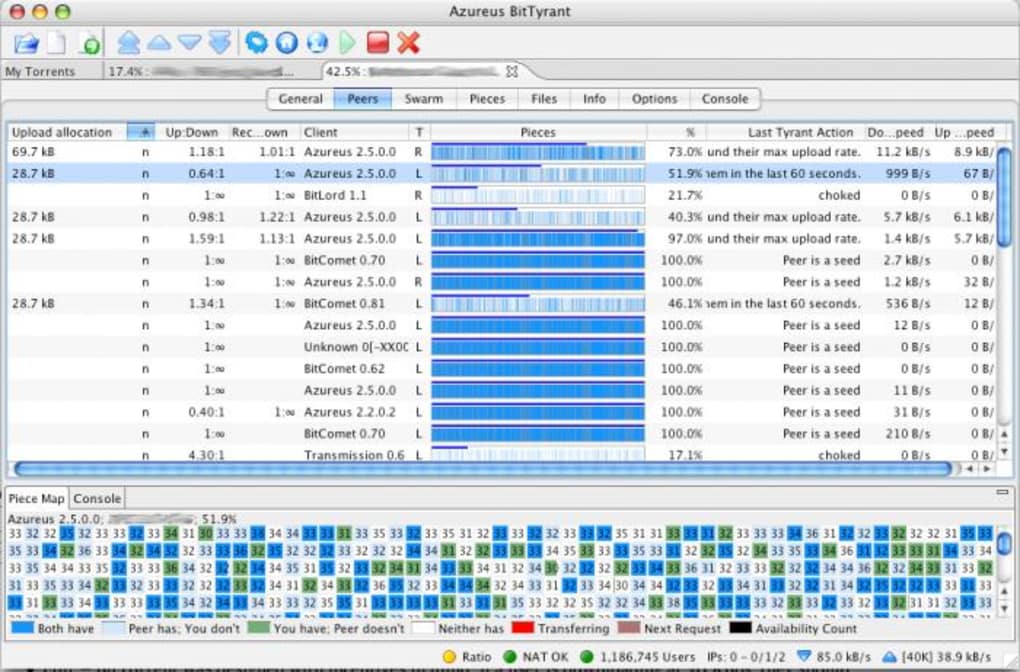
The developers claim that, under favourable conditions, BitTyrant can achieve up to three times the speed of a standard Azureus installation while still respecting the spirit of reciprocal sharing. The user interface mirrors Azureus, so long‑time users feel right at home, but hidden under the familiar panels are optional statistics that expose real‑time upload‑to‑download ratios, peer‑score breakdowns, and the “selfishness” factor that drives the algorithm. While BitTyrant does not promise miracles on congested ISP lines or torrents with few seeds, it does provide a transparent way to squeeze extra performance out of a healthy swarm.
The client is free to download, open‑source, and receives regular updates that keep it compatible with the latest BitTorrent protocol extensions. For anyone who has noticed download speeds plateauing or who simply wants a more aggressive approach to peer selection, BitTyrant offers a compelling alternative without forcing a steep learning curve.
Key Feature List
- Dynamic bandwidth‑optimised choking algorithm that favours high‑return peers.
- Full compatibility with the standard BitTorrent protocol and existing .torrent files.
- Integrated statistics panel showing real‑time upload/download ratios and peer scores.
- Same familiar UI as Azureus/Vuze, reducing the learning curve for existing users.
- Open‑source codebase with regular security patches and performance updates.
- Supports magnet links, DHT, PEX, and other modern torrent extensions.
- Lightweight footprint – runs efficiently on low‑end hardware.
- Configurable upload caps and download speed limits for ISP‑friendly operation.
Installation & First‑Run Guide
Getting BitTyrant up and running is straightforward, whether you are on Windows, macOS, or Linux. Start by visiting the official BitTyrant download page and selecting the installer that matches your operating system. For Windows users, the .exe installer provides a wizard‑style setup; macOS users download a .dmg bundle, and Linux enthusiasts can grab the pre‑compiled .tar.gz archive or use the provided repository for automatic updates.
Step‑by‑step Windows installation: Run the .exe file, accept the license agreement, choose the installation folder (the default works for most), and let the installer copy the necessary files. Once complete, launch BitTyrant from the desktop shortcut. On first launch, the client will prompt you to import settings from a previous Azureus/Vuze installation – you can skip this if you are starting fresh. Next, configure your network preferences: enable UPnP or manually forward port 6881 (or a custom port) in your router to ensure optimal peer connectivity.
macOS setup: Open the .dmg, drag the BitTyrant icon to the Applications folder, and launch it. macOS will warn you about an unidentified developer; simply go to System Preferences → Security & Privacy and allow the app. As with Windows, you’ll need to confirm port forwarding and optionally import old Azureus preferences.
Linux deployment: Extract the archive to /opt/bittyrant, create a symbolic link in /usr/local/bin for easy command‑line access, and run the binary. Many distributions also provide a .deb or .rpm package that handles dependencies automatically. After launching, edit the settings.xml file (located in ~/.bittyrant) to fine‑tune upload limits and enable the statistics panel.
Once the client is running, add a torrent by dragging the .torrent file onto the main window or by pasting a magnet link. In the “Options” tab you can enable the “Selfish mode” slider, which activates the aggressive peer‑selection algorithm. For best results, start with a modest upload cap (e.g., 10 % of your total upload bandwidth) and let the client adjust dynamically. The built‑in statistics view will immediately show how many peers are being unchoked, their upload rates, and the resulting download speed. If you encounter slow speeds, check the “Peer List” to ensure you are connected to enough seeds and that your ISP isn’t throttling the BitTorrent port.
Compatibility, Pros & Cons
BitTyrant is officially supported on Windows 7/8/10/11 (both 32‑bit and 64‑bit), macOS 10.12 and newer, and major Linux distributions (Ubuntu, Fedora, Debian, Arch). The client runs on Java 8+ because it inherits the Azureus core, so ensure you have a recent Java Runtime Environment installed. For users on ARM‑based devices (e.g., Raspberry Pi or Apple Silicon), community‑maintained builds are available, though performance may vary.
Pros
- Speed boost: Real‑world tests often show 1.5‑2× faster downloads compared with standard clients on the same connection.
- Fairness to uploaders: By rewarding peers that give back, the algorithm encourages healthier swarm dynamics.
- Low resource usage: The client remains lightweight, using minimal RAM and CPU even with many active torrents.
- Open source & free: No hidden fees, ad‑ware, or premium tiers.
- Extensive statistics: Users can monitor exact upload/download ratios and tweak settings for optimal performance.
- Cross‑platform: One code base works on Windows, macOS, and Linux.
Cons
- Dependency on Java: Requires a recent JRE, which some users consider a drawback compared to native apps.
- Variable results: Speed gains depend heavily on swarm composition; torrents with few seeds may see little improvement.
- Potential ISP throttling: Aggressive upload behaviour can trigger traffic shaping on some networks.
- Learning curve for advanced settings: Users unfamiliar with bandwidth management may need to experiment to find the sweet spot.
- Limited mobile support: No official Android or iOS client; desktop‑only usage only.
FAQ & Conclusion
Is BitTyrant really free to use?
Yes, BitTyrant is completely free. The source code is released under an open‑source licence, and there are no hidden fees or premium versions.
Do I need a special ISP plan to benefit from BitTyrant?
No special plan is required, but you need an ISP that does not aggressively throttle BitTorrent traffic. If your provider limits upload bandwidth, the client’s aggressive algorithm may be throttled.
Can BitTyrant run on my Linux server without a GUI?
Yes. BitTyrant can be launched in headless mode using the command‑line interface. You can manage torrents via the built‑in web UI or remote control tools.
How does BitTyrant affect the health of a torrent swarm?
Because it rewards peers that upload more, BitTyrant encourages reciprocal sharing, which can improve overall swarm health. However, if every client becomes overly “selfish,” it may lead to reduced cooperation, so balanced configuration is key.
Is there a mobile version of BitTyrant for Android or iOS?
Currently no official mobile apps exist. Users who need mobile torrenting should consider alternative clients that support Android or iOS.
In summary, BitTyrant stands out as a performance‑focused BitTorrent client that leverages a “selfish” choking strategy to extract more speed from healthy swarms. Its compatibility with Windows, macOS, and Linux, combined with an Azureus‑like UI, makes the transition painless for seasoned users. While the speed gains are not guaranteed for every download, especially on throttled connections or low‑seed torrents, the transparent statistics and open‑source nature give power users the tools to fine‑tune their experience. If you’ve grown frustrated with stagnant download rates or want a client that actively rewards generous uploaders, BitTyrant is worth a try.
Ready to boost your torrent performance? Download BitTyrant now, follow the quick installation guide above, and start experiencing faster, more efficient downloads today. Remember to keep your client updated to benefit from the latest algorithm improvements and security patches.







